Free 2×2 Passport Photo Maker
Upload your photo and create a properly sized 2×2 passport-style image for free. PassportSelf also creates a printable 4×6 sheet with multiple copies.
Last updated: September 10, 2026 · Reviewed by PassportSelf
- Free to use
- No account
- No subscription
- Digital photo included
- Printable 4×6 sheet included
Formatted according to supported technical requirements.
What Is a 2×2 Passport Photo?
A 2×2 passport photo is a color photo printed at 2 × 2 inches (51 × 51 mm) — the standard size for U.S. passports, U.S. visas, and many U.S. immigration forms.
The same 2×2 format is requested for USCIS applications, the DV lottery, and many ID uses. The framing rules (head size and eye position) come from the issuing agency — see the U.S. passport photo requirements for the most common case.
2×2 Dimensions
Print: 2 × 2 inches (51 × 51 mm). Digital: commonly 600×600 minimum, up to 1200×1200 pixels for U.S. government uploads.

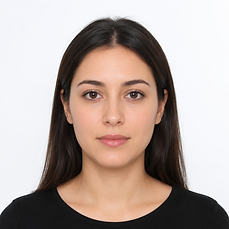
PassportSelf outputs a 1200×1200-pixel square image — sharp enough for printing and within the accepted range for digital submissions. Inches describe the printed size; pixels describe the digital file. A 2-inch print at 300 DPI needs 600 pixels; at 600 DPI it needs 1200 pixels. See the passport photo size guide for every unit.
How to Make a Photo 2×2
Cropping to 2×2 means cropping to an exact square with your head sized and positioned per the document's rules — not just any square crop.
- Upload your photo to PassportSelf.
- Choose your document (U.S. passport, visa, or general 2×2).
- Drag and zoom until your head fits the on-screen head and eye guides.
- Preview and download the finished 2×2 image.
How Head Positioning Works
For U.S. documents, the head must measure 1–1⅜ inches from chin to crown and the eyes must sit within a defined horizontal zone — PassportSelf displays both as live on-screen guides.
Drag and zoom your photo until your head fills the dashed outline and your eyes fall inside the shaded band. The exported file is always an exact square at the required pixel dimensions.
- Free to use
- No account
- No subscription
- Digital photo included
- Printable 4×6 sheet included
Formatted according to supported technical requirements.
How to Put 2×2 Photos on 4×6
2×2 is the finished photo size; 4×6 is the standard print size used to produce it cheaply. PassportSelf lays multiple 2×2 copies onto one 4×6 image with cutting guides.
Photo services print 4×6 photos inexpensively, so placing several 2×2 photos on one 4×6 image is the most economical way to get printed passport photos. Full details: passport photo 4×6 print sheet.
How to Print
Print the PassportSelf 4×6 sheet as a standard 4×6 photo at actual size and cut out the 2×2 copies along the guides.
Full instructions in how to print passport photos, including printing at CVS and printing at Walgreens. Searching for a photo studio instead? You can get a 2×2 photo without visiting a studio.
Common Mistakes
Most rejected 2×2 photos fail on head size, eye position, or accidental resizing at print time — not on picture quality.
- Head too small or too large within the frame.
- Eyes positioned too low or too high.
- Non-square crop stretched to a square at print time.
- Print service "fit to page" option shrinking the image.
- Cropping so tight that the top of the head or chin is cut off.
Frequently asked questions
How do I make a photo 2×2?
Upload your photo to PassportSelf, position your head inside the on-screen guide, and download the cropped 2×2 result. You do not need photo-editing software.
What resolution should a 2×2 photo be?
For a sharp print, aim for at least 600×600 pixels; PassportSelf outputs 1200×1200 pixels (600 DPI at 2 inches).
Can I use any photo?
The photo should be recent, front-facing, in focus, unedited, and taken against a plain light background. A casual snapshot with a busy background usually will not meet document requirements.
Can I print a 2×2 photo directly?
Most photo services do not offer a 2×2 print size, which is why PassportSelf also gives you a 4×6 sheet containing multiple 2×2 copies that prints as a standard 4×6 photo.
- Free to use
- No account
- No subscription
- Digital photo included
- Printable 4×6 sheet included
Formatted according to supported technical requirements.