U.S. Passport Photo Requirements & Maker
U.S. passport photos are 2 × 2 inches. PassportSelf helps you crop and position your photo to the required dimensions and create both a digital image and a printable 4×6 photo sheet.
Last updated: September 10, 2026 · Reviewed by PassportSelf
U.S. Passport Photo Size
A printed U.S. passport photo must measure 2 × 2 inches (51 × 51 mm), with the head between 1 and 1⅜ inches (25–35 mm) from chin to top of head.
The eyes must sit between 1⅛ and 1⅜ inches from the bottom of the photo. Getting head size and eye position right is the most common failure point — PassportSelf shows these zones as on-screen guides while you position your photo. See our full guide to U.S. passport photo size requirements.
U.S. Passport Photo Background
U.S. passport photos require a plain white or off-white background with no shadows, texture or lines.
A blank interior wall, a white door, or a sheet of white poster board all work. Stand about a foot away from the wall to avoid casting shadows. More tips in our passport photo background requirements guide.
How Your Head Should Be Positioned
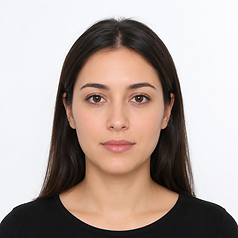
Face the camera directly with your full face visible, head centered, and nothing covering the face.
- Look straight at the camera — no tilting or turning.
- Keep both eyes open and your mouth closed.
- Hair should not cover the eyes or eyebrows.
- Head coverings are only allowed for daily religious or medical wear, and the full face must remain visible.
- Free to use
- No account
- No subscription
- Digital photo included
- Printable 4×6 sheet included
Formatted according to supported technical requirements.
What Should You Wear?
Wear normal everyday clothing. Uniforms and camouflage clothing are not allowed, except religious attire worn daily.
Avoid white tops — they can blend into the required white background. A collared shirt or top in a medium tone photographs well. Do not wear hats or headphones.
Can You Wear Glasses?
No. Glasses are not allowed in U.S. passport photos unless you cannot remove them for medical reasons and include a signed doctor's statement.
This rule has applied since November 2016. Remove glasses before taking your photo — retakes for glasses glare are one of the most common photo rejections.
Can You Smile?
A neutral expression or a natural, unexaggerated smile is acceptable — both eyes must be open and your mouth closed.
A wide grin that distorts your features can cause rejection. When unsure, use a relaxed neutral expression.
Can You Take a Passport Photo With an iPhone?
Yes. Any modern phone camera, including an iPhone, takes photos of sufficient quality for a U.S. passport photo.
Have someone take the photo from about 4–6 feet away (or use a tripod with a timer), in even lighting, against a white background. Then upload it to PassportSelf to crop it to the exact 2×2 format. Full instructions: how to take a passport photo at home.
Can You Take a Passport Photo at Home?
Yes — the U.S. Department of State accepts photos taken at home as long as they meet the published requirements.
You do not need a photographer. Take the photo yourself, then use PassportSelf to size and position it correctly.
- Free to use
- No account
- No subscription
- Digital photo included
- Printable 4×6 sheet included
Formatted according to supported technical requirements.
How to Print Your Passport Photo
Download PassportSelf's 4×6 sheet and print it as a standard 4×6 photo at home or at any photo-printing service — without resizing or cropping.
- Create your photo with PassportSelf and download the 4×6 sheet.
- Print it as a standard 4×6 photo print (at home, or at a pharmacy or supermarket photo counter).
- Make sure no "fit", "fill" or "resize" option changes the image.
- Cut along the printed guides.
Detailed steps for printing a passport photo at CVS and printing a passport photo at Walgreens.
Official U.S. Passport Photo Requirements
The requirements below come from the U.S. Department of State and are stored in PassportSelf's requirements database, reviewed against the official source.
Official source: travel.state.gov — Passport Photos · Requirements last reviewed: shown in the table below.
| Requirement | U.S. Passport — Paper Application |
|---|---|
| Print size | 2″ × 2″ (51 × 51 mm) |
| Head height | 1–1.375 in |
| Eye position | 1.125–1.375 in from the bottom edge |
| Background | Plain white or off-white background with no shadows, texture or lines |
| Expression | Neutral facial expression or natural smile, both eyes open, mouth closed |
| Glasses | Glasses are not allowed unless required for medical reasons with a signed statement |
| Head coverings | Not allowed unless worn daily for religious or medical reasons; the full face must be visible |
| Photo age | Taken within the last 6 months |
| Digital editing | The photo must not be digitally altered or retouched. No filters, no beauty apps, no background editing. |
Official source: U.S. Department of State · Requirements last reviewed: August 26, 2026
Frequently asked questions
How recent does my passport photo need to be?
The U.S. Department of State requires the photo to have been taken within the last 6 months and to reflect your current appearance.
Can my passport photo be black and white?
No. U.S. passport photos must be in color.
Can I edit or retouch my passport photo?
No. The photo must not be digitally altered — no filters, beauty apps, or background editing. PassportSelf only crops, sizes and positions your photo; it never changes your appearance.
What do I receive?
A high-resolution digital 2×2 photo and a printable 4×6 sheet containing multiple copies with cutting guides, both free to download as soon as they are generated.
Does PassportSelf guarantee acceptance?
No service can guarantee acceptance. PassportSelf formats your photo to the published requirements; the final decision always belongs to the U.S. Department of State.
- Free to use
- No account
- No subscription
- Digital photo included
- Printable 4×6 sheet included
Formatted according to supported technical requirements.